Restricted Site Access
Restrict access to registered users and specific IP addresses. Control restriction behavior.
Limit access your site to visitors who are logged in or accessing the site from a set of specified IP addresses. Send restricted visitors to the log in page, redirect them, or display a message or page. A great solution for Extranets, publicly hosted Intranets, or parallel development / staging sites.
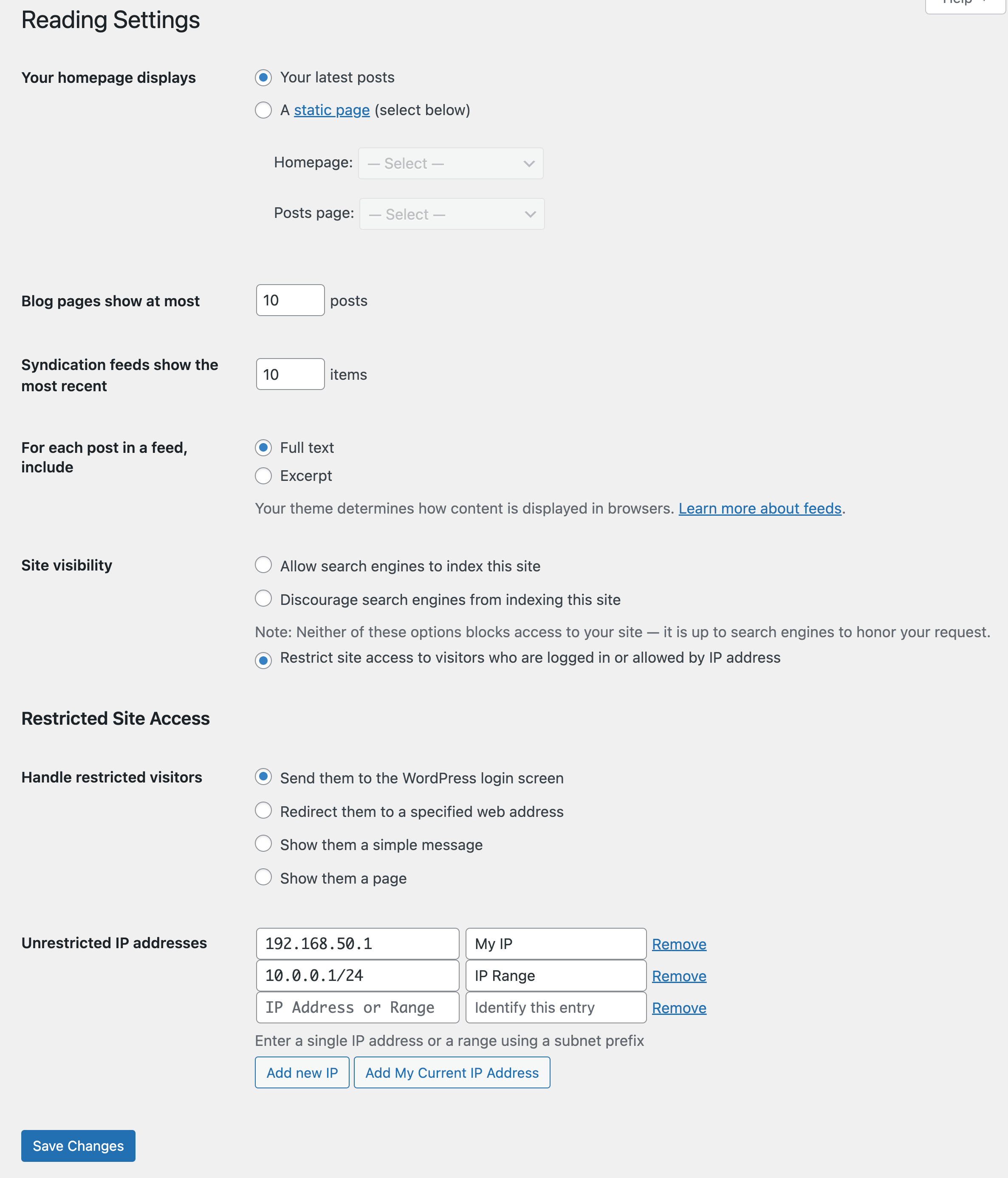
Adds a number of new configuration options to the Reading settings panel as well as the Network Settings panel in multisite. From these panels you can:
- Enable or disable site restriction
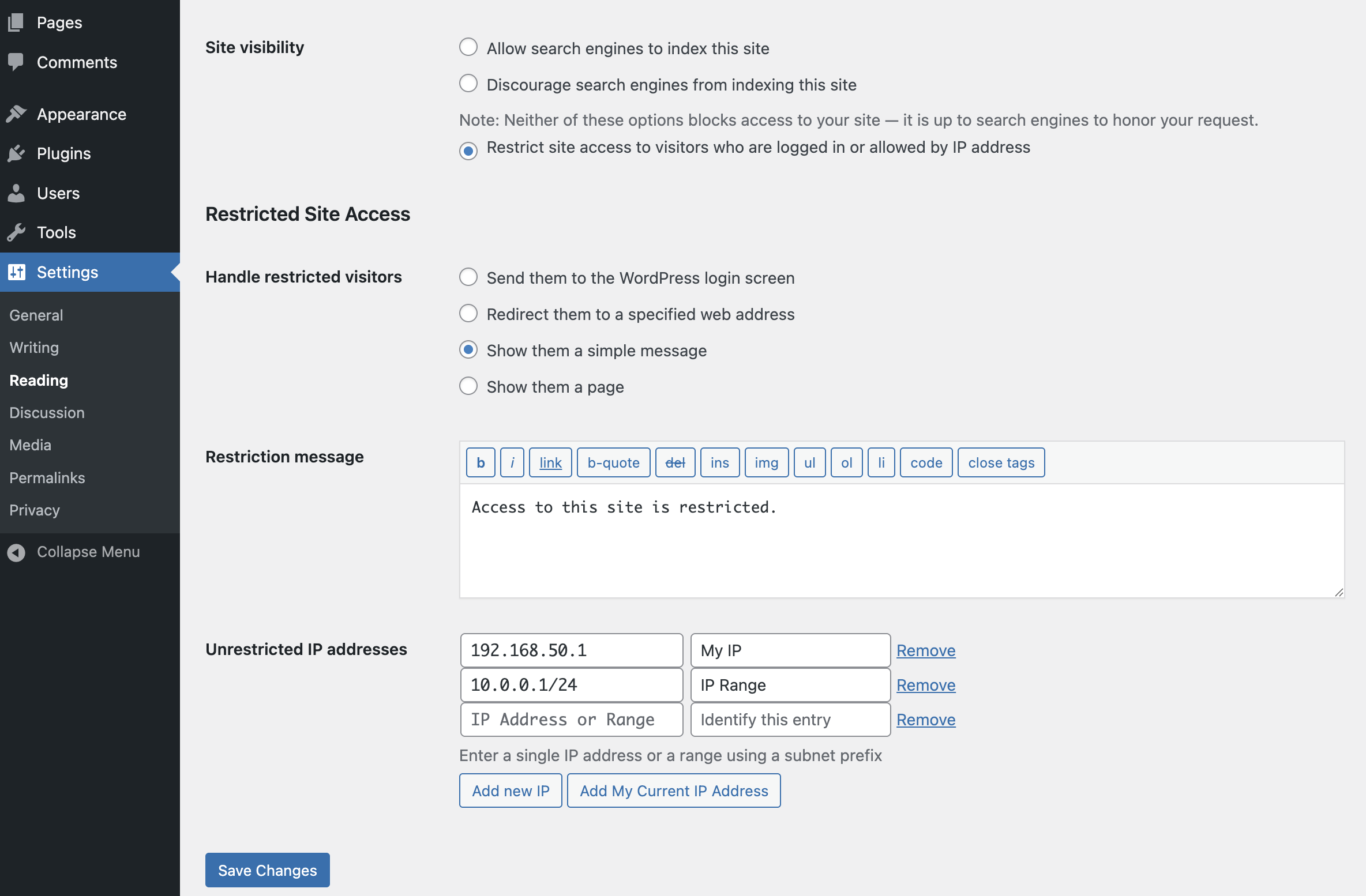
- Change the restriction behavior: send to login, redirect, display a message, display a page
- Add IP addresses to an unrestricted list, including ranges
- Quickly add your current IP to the unrestricted list
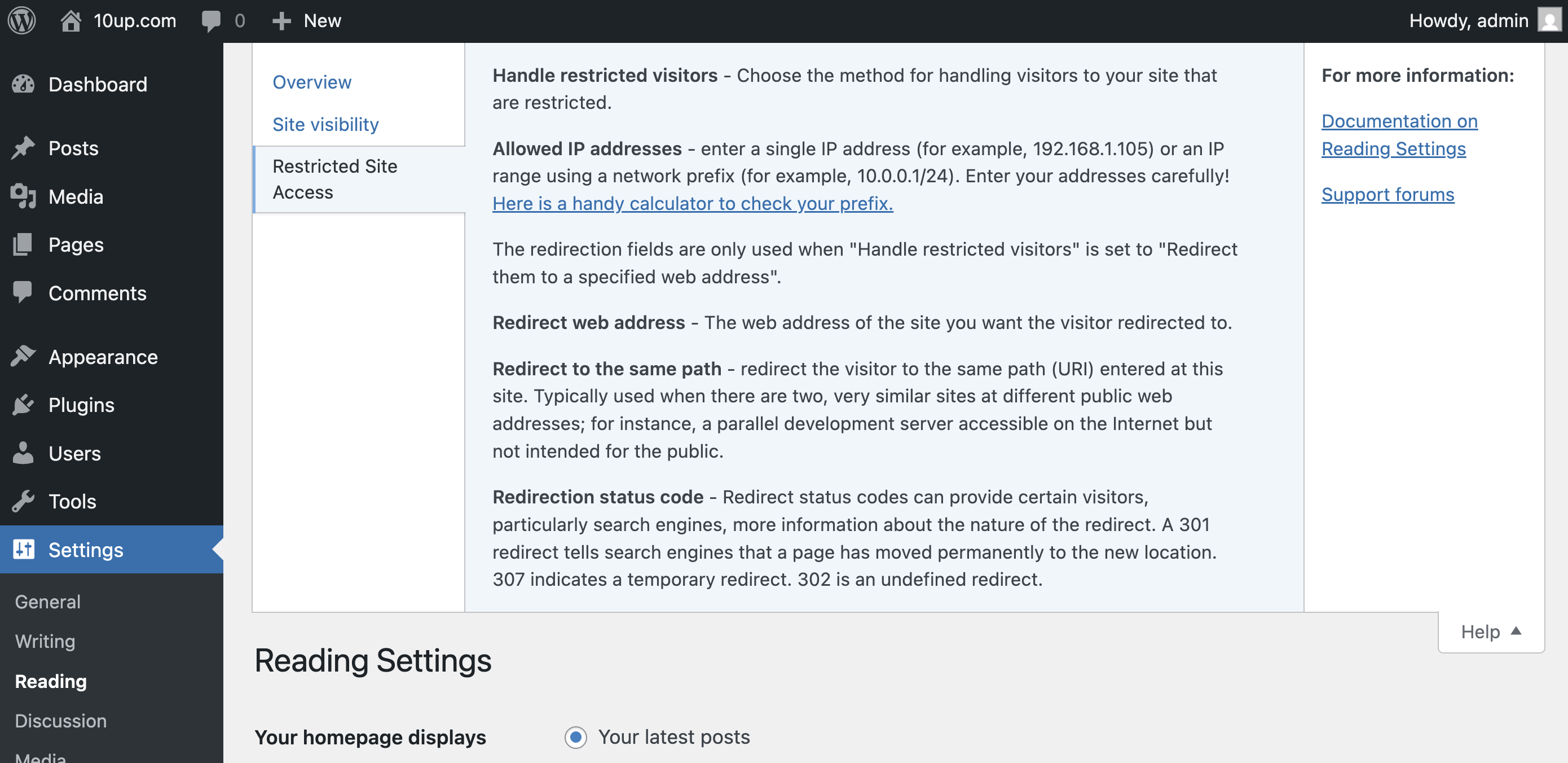
- Customize the redirect location, including an option to send them to the same requested path and set the HTTP status code for SEO friendliness
- Define a simple message to show restricted visitors, or select a page to show them – great for “coming soon” teasers!
- Rating

- Requires 6.9+
- Downloads 1,218,902
- Updated 2026-08-27
This is a great plugin. I would suggest adding a template file for the “display a message” option. It would be great to be able style that page.
Just do a PHP include in the relevant function.
Otherwise, amazing!
Thanks! I’ll definitely consider that in a future update. In the meantime, you can always override the “restricted” handling and make it load a template using the built in hook if you’re comfortable with actions / filters.
I agree this is a good plugin. May I ask – in redirecting the user to the login screen I note they cannot access the Register functionality. Is there a way to circumvent this behaviour as while I wish to block anonymous users from accessing the site (it’s a publically visible intranet) I do want to provide a mechanism for allowing them to register?
Regards
Simon
I need to know if this is possible too.
Thank you.
Me too. It’s FUNDAMENTAL.
SOLUTION
Put this into your functions.php file. In this case I used ‘register’ as the page I want to allow:
add_filter( ‘restricted_site_access_is_restricted’, ‘my_rsa_page_override’, 10, 2 );
function my_rsa_page_override( $is_restricted ) {
// get the post or page slug
global $post;
if( $post->post_name = ‘register’ ) {
$is_restricted = false;
}
return $is_restricted;
}
We have added this on a multisite build, but it has made all sites in the network now restricted?
Can this be modified to work on multisite projects?
Sorry jumped the gun, I’ve created another child theme for the restricted site and pasted this into it’s functions.php file.
However I’m now getting an error:
Creating default object from empty value in \functions.php on line 22
the error message is displayed and you can access the site again
:(
Hi Jake,
nice plugin – how do I access the protected site’s RSS feed? I’m logged in so that I can see the restricted access page, but when I go to the feed page, I get an error message.
Thanks,
Fritz
Not able to replicate this. If I’m logged in I can view the feed without issue. It’s blocked if I’m not authorized. Maybe another plug-in is causing a problem?
Yup, same problem.
Thanks.
I am having the same issue. I would like to use the restricted access feature, while also recieving the rss feeds into various external programs. If I make the site visible to the general public, then posts can be read and fed. If I restrict access, then they cannot be read by any feed readers. How does one get both to work?
Oh, I see the issue. I could theoretically add an option to disable the “blocker” on the RSS feed, but it’s important to understand that this would make the feed open to anyone with the feed URL, logged in or not. Thoughts?
“Oh, I see the issue. I could theoretically add an option to disable the “blocker” on the RSS feed, but it’s important to understand that this would make the feed open to anyone with the feed URL, logged in or not. Thoughts?”
EXACTLY what I’m after. Using this in a private network with restricted access but feeds should be open to allow replication of posts.
I need the same feature, have you reached one solution Marc?
Hi. Where in system can I make this change?
Same here, love to use this but the lack of a open RSS feed is a dealbreaker for me.
This plug-in works very well and I’m happy to have found it.
I have a website related to my newly restricted blog that is also restricted using php session variables keyed on its own log-in screen. I’ve now referenced the wp blog databases to compare ID’s and passwords to for restricting the website pages. What code do I include on my website pages to accept the wp log-in so a user can move between the website and the blog without having to re-login?
Thanks in advance for the help.
Greg
Never mind. It’s working. :)
I do have one other problem though. The “redirect visitor to” option doesn’t seem to be working for me. The link at the top left corner of the login page should go to the URL I entered right? Well right now it just keeps leading back to the same login page.
Otherwise I’m loving the plugin though. Great stuff.
You probably need to select the “redirect visitor” option from the drop down that determine the behavior. I’m hoping to make that UI a bit more intuitive in a future update.
I really love this plugin but i cannot use it because i do not want to restrict access to my whole site just certain pages and content, if you could update this plugin to include custom page and content restriction it would be the #1 plugin for restricted access plugins for sure!!
I’ve been asked this a few times, but I’m really only interested in making this an efficient plug-in for blocking the entire site.
I just wanted to block access to my website by IP addresses. It would be nice to have this feature in one of the next versions.
The goal of the plug-in is to block access to everyone, except under a few select conditions. The use case is private websites and development sites.
IP-GEO-BLOCK:
https://en-gb.wordpress.org/plugins/ip-geo-block/
or
Wordfence
https://en-gb.wordpress.org/plugins/wordfence/
has this functionality
Regarding the RSS feed mentioned above. My entire site is restricted and users are only allowed in after a pre-approved process – so security is not so much of an issue.
However – all my users need to be able to access the RSS feed – even though the site is restricted.
Can you point me in the right direction to “unrestrict” the RSS feed(s)
What a brilliant plugin this is. Thank you so much for this Jake!!!!!!
I agree with eOne. The best plugin I’ve used so far. Thank you, Jake.
Hi, this is a great plug-in!
But how do I allow people to register? I want only registered users, but I want people to be able to register – is that possible?
Can I make a wordpress page with login or sign-up form, and redirect them to that page? If so, how can I put “sign in” and “sign up” on a WP page?
Kepp up the good work!
Rune
You can set the plug-in to direct users to the login screen. If you turn on the “Anyone can register” option under General Settings, they’ll have the option to sign up.
This actually doesn’t answer the question. If you do what you are recommending, we actually don’t need your plug-in. I installed this plug-in and set it to forward to a page I created. The page I created had a register and forgot password link. Those stopped working because, every time someone clicked them, the site would be restricted again. I had to uninstall the plug-in because no one could register. Is there any way to fix that? Maybe make a list of exception pages that can be viewed?
I have the same issue.
Seems like it will only allow access to wp’s own login and not a third party say wp-members login, which is a shame as wp’s own login is a bit crass :-)
I don’t fully understand the limited access example you have given re:RSS
Would it be possible to give an example of a page that you can get it to redirect to after getting the home page up.
Example:
I land on the home page
There I have login and registration links
(Can these be direct to a page I created in wp-members (their login / reg))
That would be ideal
Any comments on this Jake as to how to get around this.
Other than that it does what it says in a great manner.
Thanks
Amir
Your plugin doesn’t seem to be working for my site. I’ve checked off
“Restrict site access to visitors who are logged in or allowed by IP address” and also “Send them to the WordPress login screen.”
I have NOT added my IP address. However, when I log out of Site Admin
and then retype the site address in the address bar, I am admitted to the site without having to go through the login screen. BTW: I have used your plugin in another domain and had no problems with it. Not sure what the problem could be this time.
Are you using a caching plug-in with a page cache? I don’t know why it wouldn’t be working; you may have a conflicting plug-in.
Hi again. I’ve gone ahead and installed a different plugin to restrict access to my site. Still … if you know, off the top of your head, the answer to my issue I would be interested to hear it, as I like your plugin for its simplicity. Thank you.
It the caching plug-in. Wait for a few days for the cache plugin to kick in, and it will lock down.
In general, this plug-in will not work particularly well with WordPress implementations that use page caching plug-ins, since it needs to dynamically determine on load (via PHP) whether to show the site or block it. Since page caching plug-ins skip most of the PHP processing and save the raw output, the blocked or unblocked version will be saved depending on what the first user sees when the cache is generated.
Many page caching plug-ins offer an option to not use the cache when the user is logged in; this will enable the plug-in to work based on the logged in state. However, using the IP whitelist will not work with most page caching plug-ins.
Any information on unblock the RSS?
Can this plug in be used to restrict access to a specific page based on IP addresses? I currently allow anyone to download trials of our software and have been requested to block this from all users outside of the US.(I know it’s stupid…but I need to do it). Any ideas? Thanks.
Using the hooks, yes. I’m hoping to offer some documentation on this soon.
Hi, I am using your plugin whilst in development, however it seems to disrupt something in the Next Gen gallery slideshow. For some reason even if I am logged in as admin, the NG slideshow (using JWplayer) won’t work.
thanks!
elvina
I can’t imagine why the hooks in here would conflict, but I can investigate.
Any information on how to allow RSS feed yet? Desperately need this.
Hi. While rebuilding my blog I installed WP in a new dir and restricted access. It worked just fine. When ready I changed the restriction and deactivated the plugin. So far so good. Then I redirected the old dir to the new dir in .htaccess ‘RedirectPermanent /olddir http://mysite,com/newdir‘ It seems to work fine but it is not. Bing can’t access the blog and ‘HTTP Response Header’ reports: Status: HTTP/1.1 302 Moved Temporarily.
Please advise
Hi,
Please ignore my previous post.
The cause of my problem was the Transposh plugin’s automatic translation option. I deactivated the option and the problem seems to be solved.
Thanks Jake for a great plugin.
I have a very quick question about this plug-in. How do I make it so that the user, after signing in, goes directly to my home page instead of the user profile page?
Thanks
we have tried this plugin. It would do exactly what we want, ie restrict access to logged in users only except for from a specific IP address. Unfortunately, there seems to be a bug with the current version of WordPress + iOS apps which means that users cannot add the site to the mobile app. The app returns a ‘Sorry, can’t log in, Blog returned invalid data’ error
I’ll investigate for the next update.