Restricted Site Access
Restrict access to registered users and specific IP addresses. Control restriction behavior.
Limit access your site to visitors who are logged in or accessing the site from a set of specified IP addresses. Send restricted visitors to the log in page, redirect them, or display a message or page. A great solution for Extranets, publicly hosted Intranets, or parallel development / staging sites.
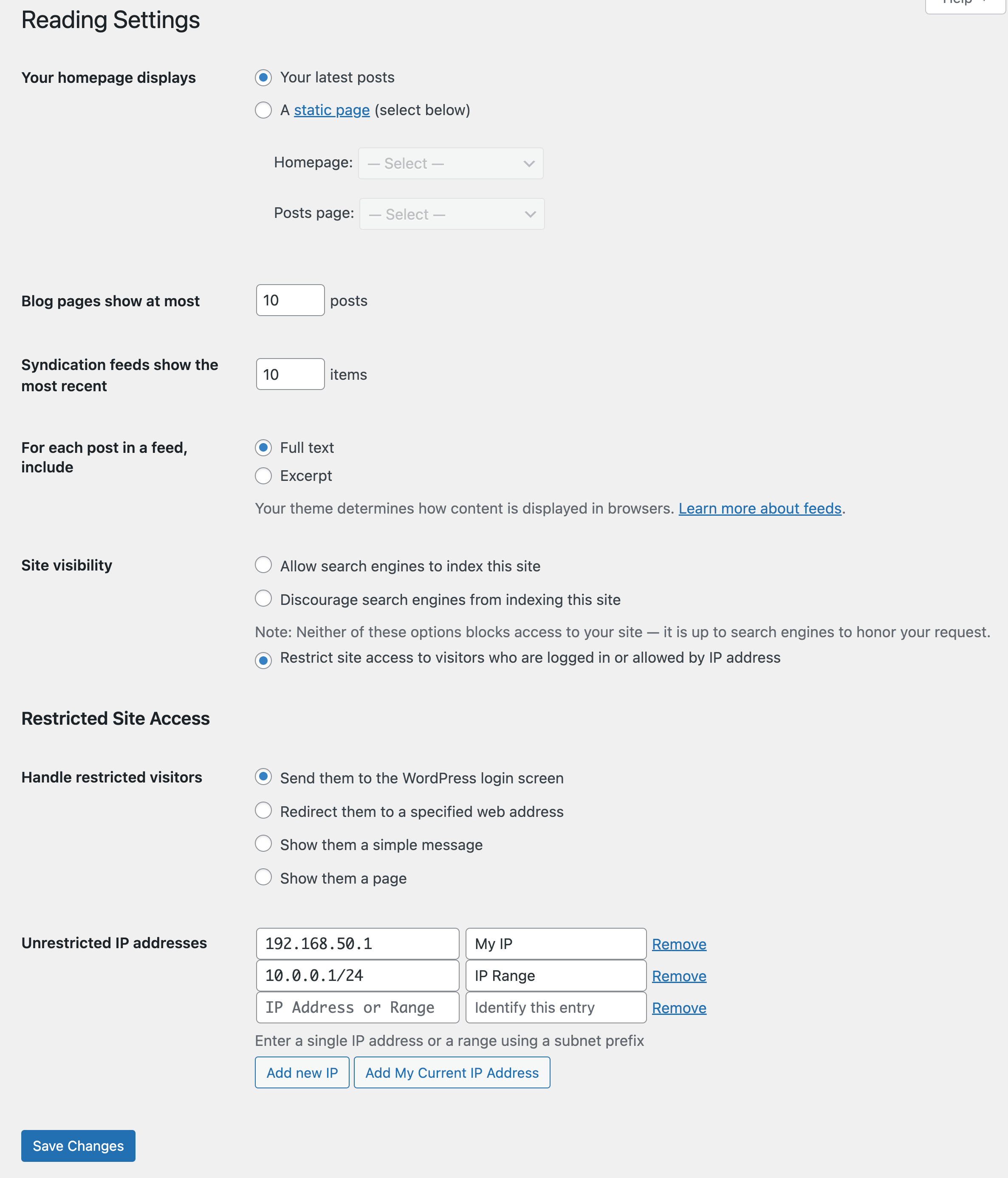
Adds a number of new configuration options to the Reading settings panel as well as the Network Settings panel in multisite. From these panels you can:
- Enable or disable site restriction
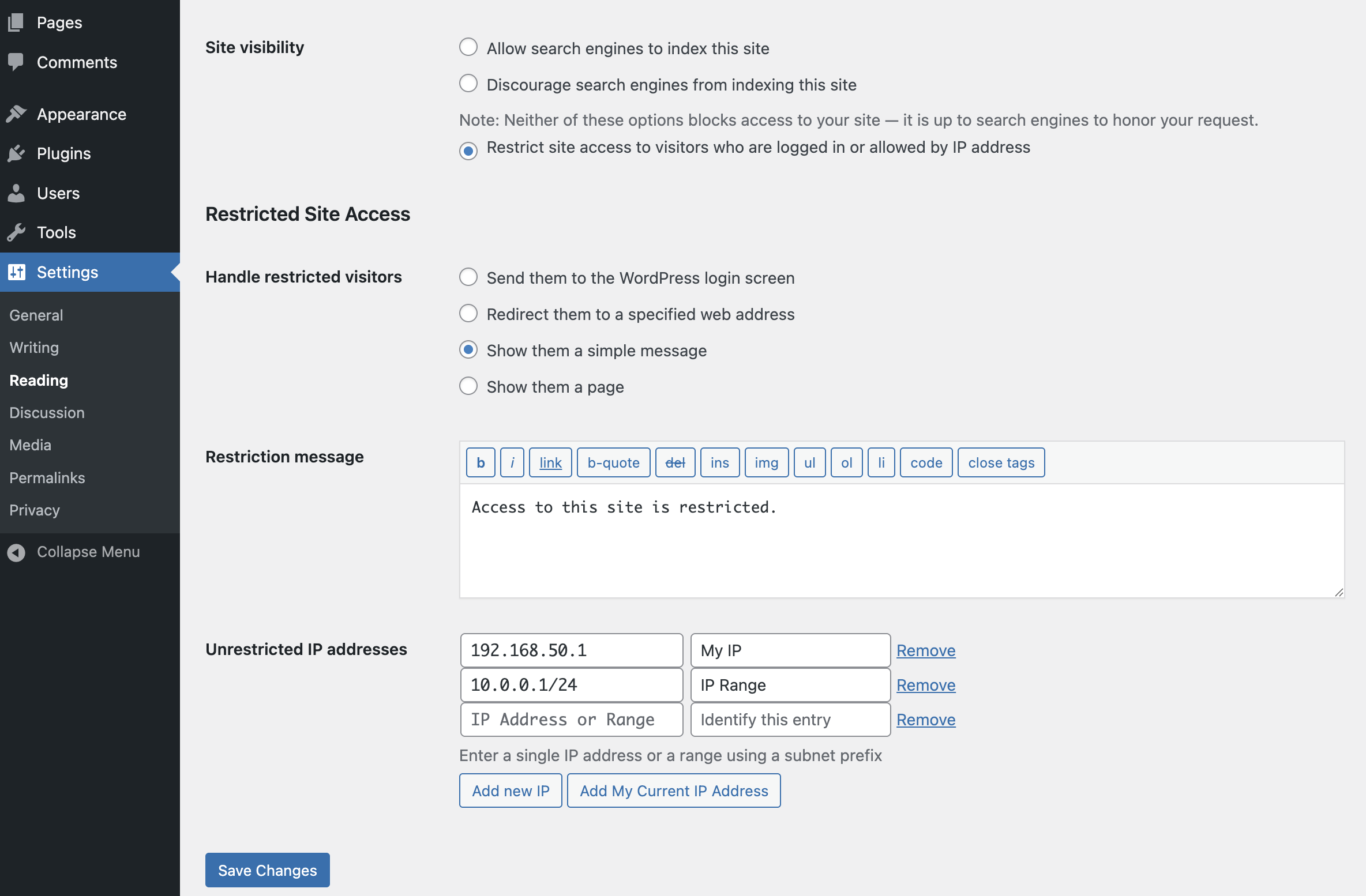
- Change the restriction behavior: send to login, redirect, display a message, display a page
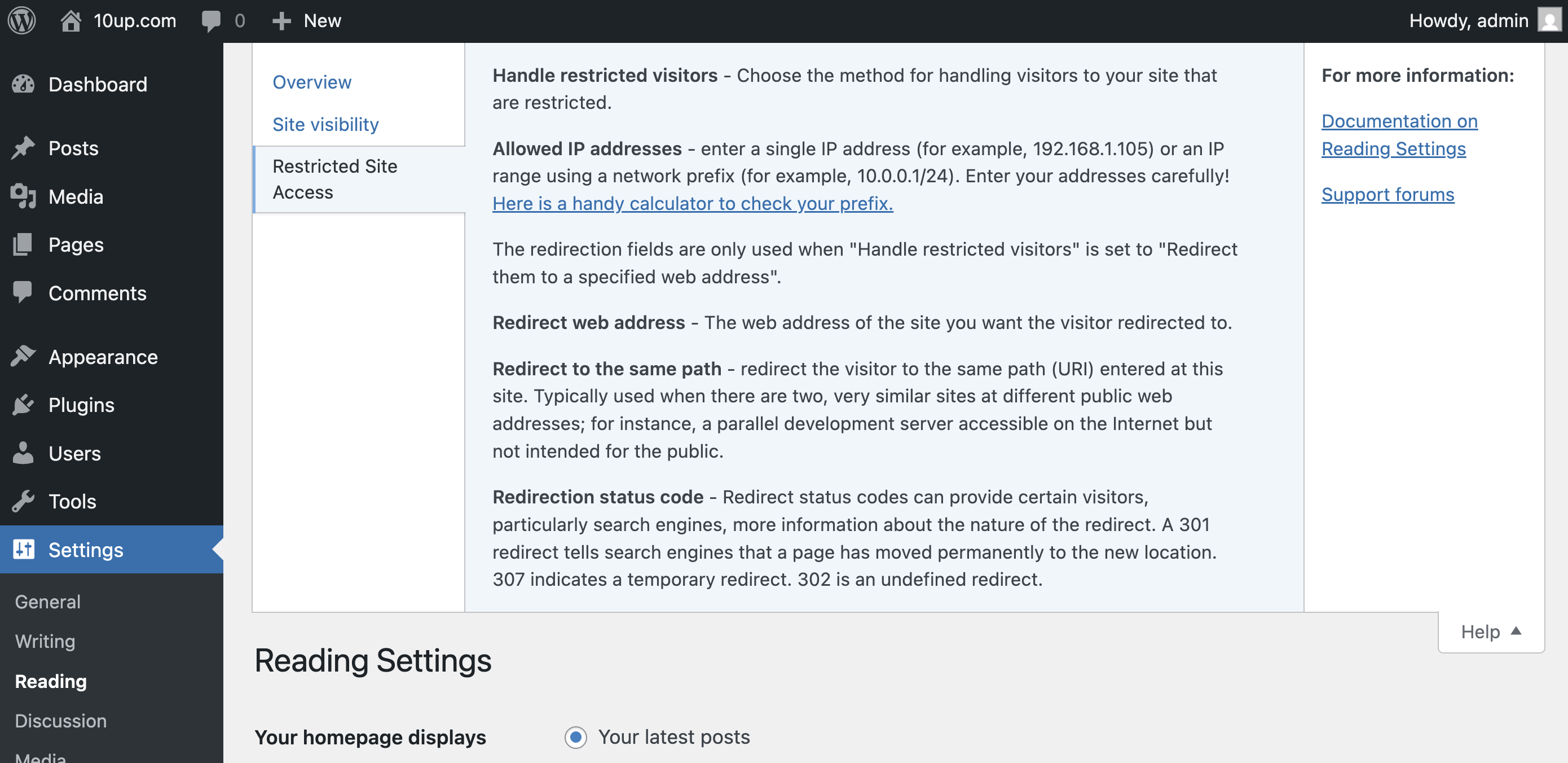
- Add IP addresses to an unrestricted list, including ranges
- Quickly add your current IP to the unrestricted list
- Customize the redirect location, including an option to send them to the same requested path and set the HTTP status code for SEO friendliness
- Define a simple message to show restricted visitors, or select a page to show them – great for “coming soon” teasers!
- Rating

- Requires 6.6+
- Downloads 1,138,489
- Updated 2026-01-04
Is there any way add a URL/domain name to the unrestricted list?
I am attempting to setup automatic email digest of rss feeds using MailChimp/HubSpot, and I need to unrestrict their domain name so they can pull rss feed data into the automatic email digest. They use dynamic IP’s for the engine that pull data, so I am unable to use a single IP. Thanks!
Hi Jake,
First of all, this is a fantastic plugin! Thank you very much.
Could I check to see if there’s a way for me to know if the range of IP address are working. So far, I have no problems getting a single IP address unrestricted.
But whenever I try to have range of IP addresses unrestricted, it doesn’t seem to work. Perhaps, I’m doing something wrong.
Any advice?
Hi there,
I notice that with Restrict Site Access the WP API stops to work… is there a way to solve it?
Thanks,
Cristiano
We’re actively working on a fix.
I am loving this plugin but i have one question actually a kind of problem. I am trying to login from different computer by using one account but the last logged in user lasts and the session for the first one is destroyed.
Scenario:
User A login from PC A
User A login from PC B
User A is from PC B is logged but User A from PC A logs out.
Can we have concurrent access for users who are given access?
Hi Jake,
I see the plugin hasn’t had a lot of updates over the last period, which could point to the fact it’s just doing what it should :-)
I, however, noticed that the plugin does not block access to direct links in the media folder (ie. images, pdf files or anything else in the media folder). Should the plugin also block these or am I messing up the functionality with my local setup ?
Thanks,
Roel.
Is this plugin still maintained?
WordPress 4.7
So we have “Restrict site access to visitors who are logged in or allowed by IP address” checked along with “Send them to the WordPress login screen” as how to handle visitors.
This works fine, absolutely no problems, anyone who visits the site has to login.
We decided to change it so that anyone on campus has unrestricted access to the site and anyone off campus has to log in.
If we add our campus subnet to the “Unrestricted IP addresses” list in the format xxx.xxx.xxx.xxx/16 ANYONE is allowed access to the site, not just IP addresses matching those within the subnet.
Am I missing something really obvious? Could it just be this isn’t compatible with 4.7?
We are using Restricted Site Access with the Show WordPress Page. On this page we have text to tell the user why they need to log in and a re-direct to another system (one we built ourself) that will log them in and re-direct them back to the wordpress site. This all works correctly but we would like the permalink from the page they wanted to see to be processed to generate the URL link that they are sent to on the login system. Can you give me some hints on where in the code (maybe a filter) we should look to get this working.
thanks.
Hi, many thanks for your marvelous plugin, I’m having a small issue though. I’m currently loading restricted site RSS feed to an another site, seems like RSS feed is blocked by your plugin, how can enable on the RSS feed to broadcast. How can I create a filter for this.
This is good plugin.
but, what if I want to restrict users by ROLE, how do I do that?
A user must be logged in, and must be of a specified ROLE, to be able to access ANY PART of the website.
Is this possible??
Thanks..
We have loved using this plugin for many years and are now encountering problems with the latest WordPress version (4.7.3). Hopefully this project has not been abandoned has it? There don’t seem to be any good alternatives out there.
We find that with the latest version of WordPress access is denied to users with whitelisted IP addresses although this can sometimes be circumvented by repeatedly reloading the page. We have not had this problem prior to the latest version of WordPress.
Hi there,
Please I need some urgent help here, I was working on the website with the plugin on and suddenly although my IP was allowed I started seeing the same screen for blocked ips and now not even disabled my site loads, it is still blocked. I can only access the admin panel.
I have already deleted it and the website still won’t load! I even checked the tables on MYPHPadmin and there’s nothing there after I deleted the plugin,but still the site won’t load! I don’t know what else I can do!
Can someone help me out here, please??
Thank you,
Lílian.
I just found out that it was a conflict with wp fastest cache , I don’t know why it happened though, both plugins were running together seamlessly some days ago.
Now I had to disable wp fastest cache in order to access the website.
Hi there,
When trying to add an ip address the box shakes like it’s not valid. Any idea why it doesn’t accept the IP address, even used one from the screenshots above without succes.
I have this same issue?
Hi,
Can I use the plugin to add a range of IPs like x.x.*.* ?
thank you,
The plugin accepts subnets for defining ranges (not wildcards).
This broke my site after upgrading to WP 4.9. The plugin started restricting *all* access to the site instead of just admin login access.
The plugin is designed to resist access to the entire site, not just the admin. Perhaps I misunderstand the problem? (I can confirm that the plugin works on 4.9.)
the plugin causes a redirect after another, I’m no longer come on the loginpage of WP
This plugin broke my site after upgrading to WP 4.9.1 – the plugin is now only redirekt on the registration page and repeats this over and over again. pls help an contact me for update – thx
Hi Michael – while we’re not sure that this is related to the issue that you’re seeing, we are working on an update to the plugin to improve redirect handling.
Hi,
Is there any update or pro version to restrict “registered users” instead of “logged in” users?
I have a multisite installation and i need to restrict some users of entering a intranet (not back office of wordpress dashboad). The problem is that logged in users have access to all sites (intranet ) in the network.
Instead of a “logged in” users restriction is it possible a “registered user” restriction?
Best Regards
Hi, I totally love this plugin, is there anyway of adding another few pages visable for the front end as an option, so you can have half of your site visable and some hidden only for those who have an IP? would be awesome, but yeah, love it.
The box just shakes when I try to add an address. Any ideas?
Are IP address ranges entered into the Unrestricted IP addresses field using CIDR, like this: 192.168.0.1/24?
Useful enhancement: a Note or Desc. field next to each IP address or range to easily identify the source. Great plugin, BTW.