Restricted Site Access
Restrict access to registered users and specific IP addresses. Control restriction behavior.
Limit access your site to visitors who are logged in or accessing the site from a set of specified IP addresses. Send restricted visitors to the log in page, redirect them, or display a message or page. A great solution for Extranets, publicly hosted Intranets, or parallel development / staging sites.
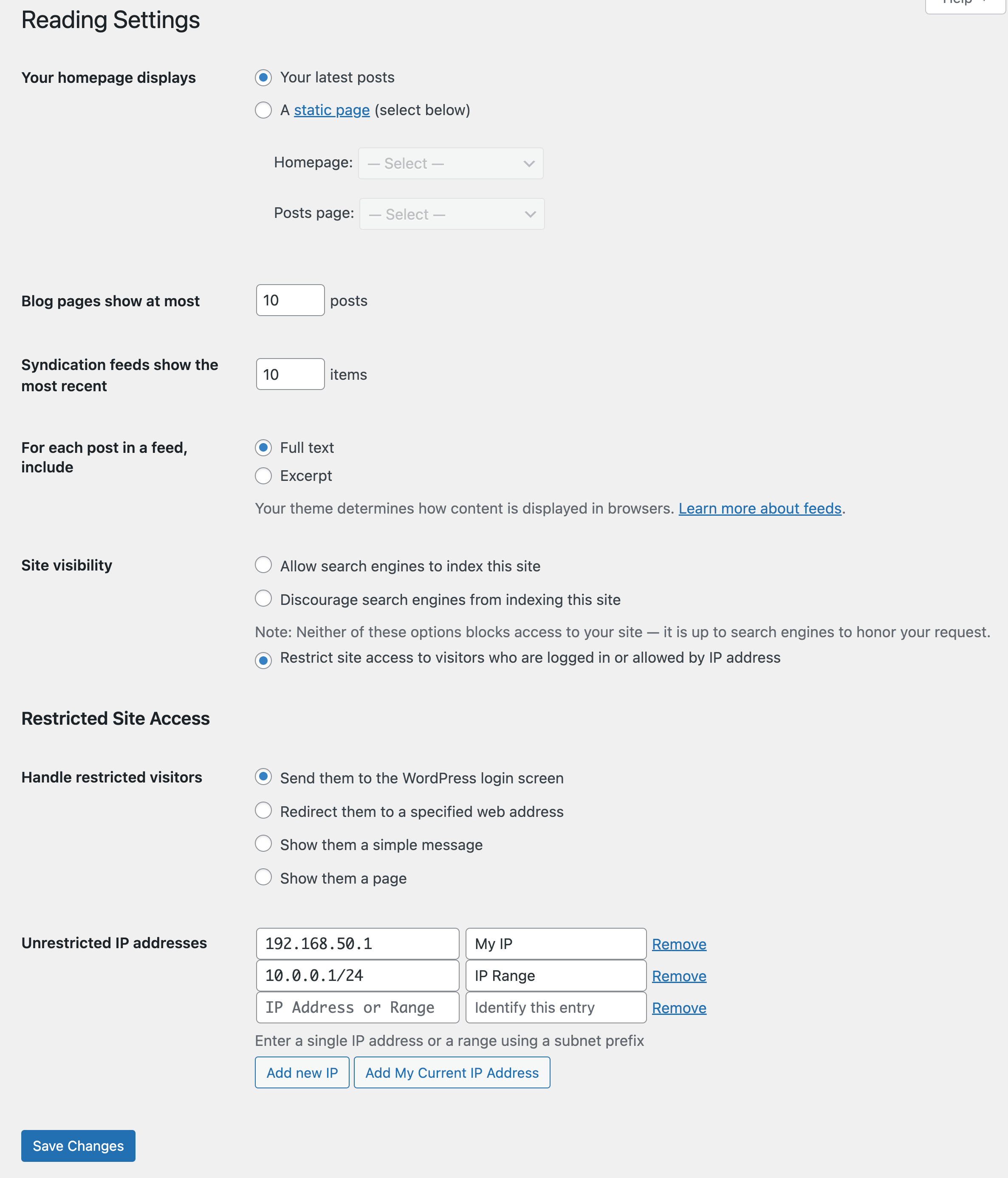
Adds a number of new configuration options to the Reading settings panel as well as the Network Settings panel in multisite. From these panels you can:
- Enable or disable site restriction
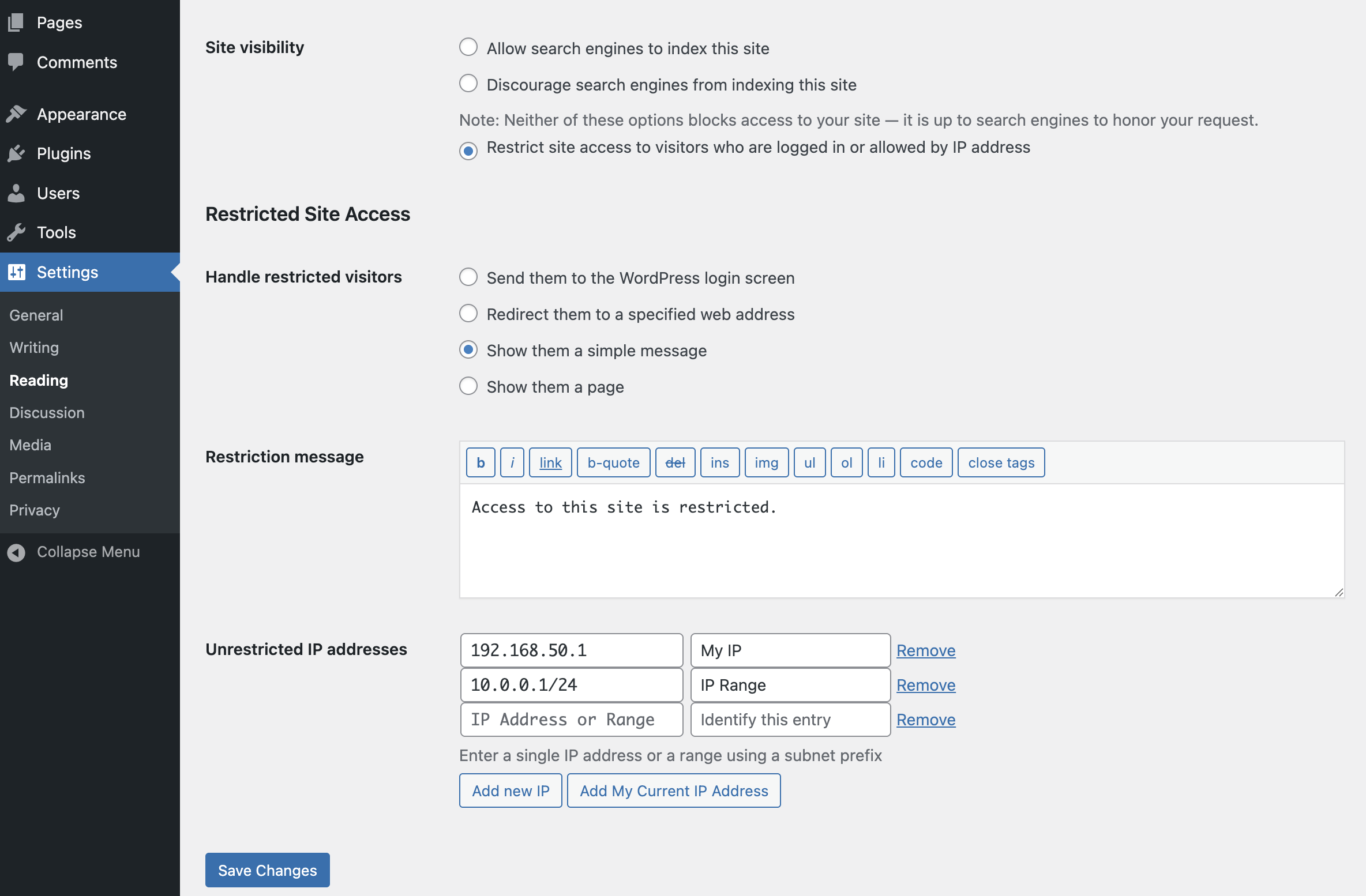
- Change the restriction behavior: send to login, redirect, display a message, display a page
- Add IP addresses to an unrestricted list, including ranges
- Quickly add your current IP to the unrestricted list
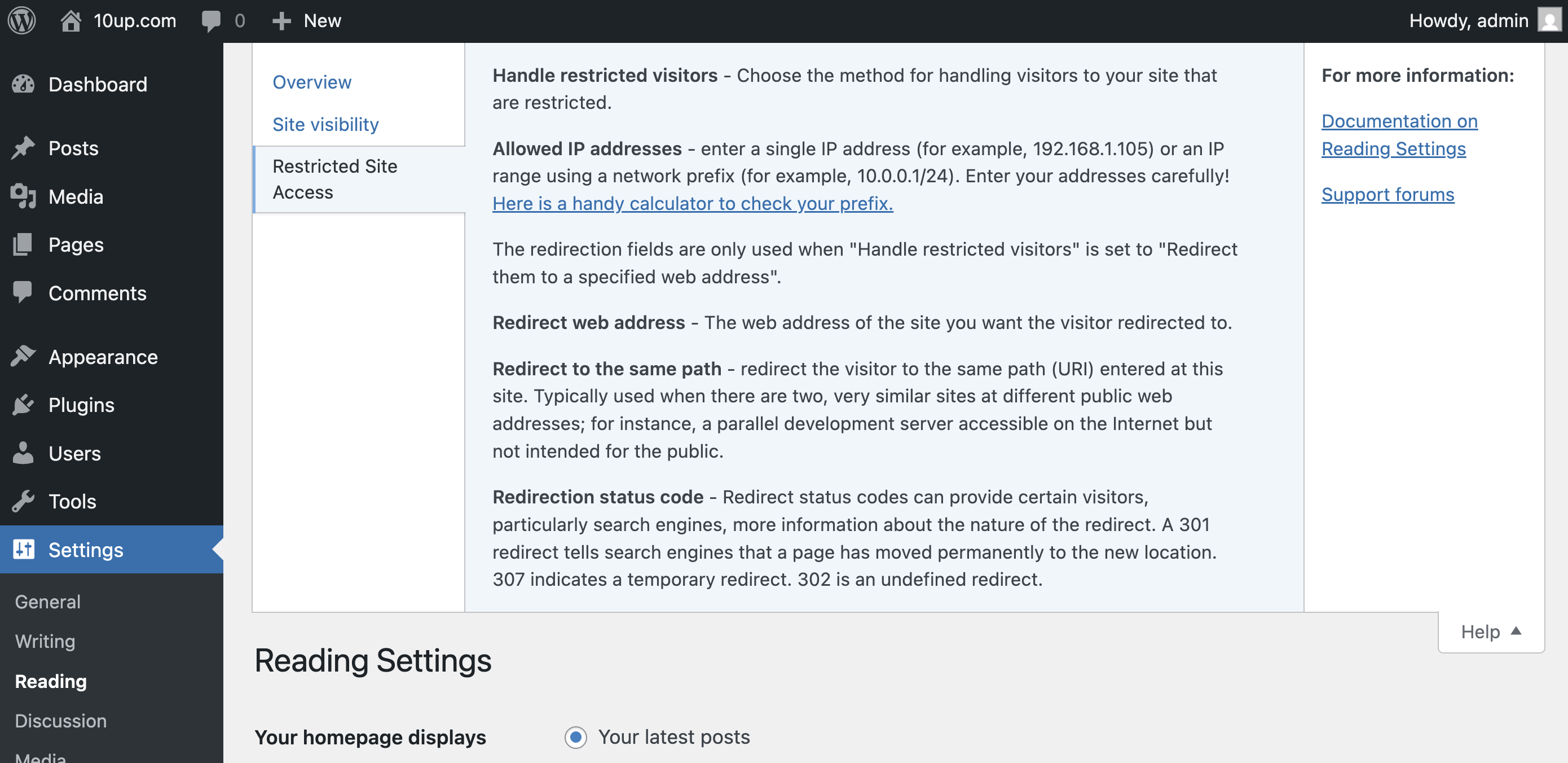
- Customize the redirect location, including an option to send them to the same requested path and set the HTTP status code for SEO friendliness
- Define a simple message to show restricted visitors, or select a page to show them – great for “coming soon” teasers!
- Rating

- Requires 6.6+
- Downloads 1,138,489
- Updated 2026-01-04
We just moved a site over to WPEngine that has this plugin. Now the whitelist isn’t working at all. Every request is asking for a login. We have content caching disabled. Any ideas?
Hi Guys,
This plugin was working great until the last update. Now when logged in you cannot see the site and still shows my restricted landing page. Before the update anyone logged in could see the full site but it seems to have gone now?
Thanks
Mark
We apologize for the bug that slipped through. It was fixed the next day.
I believe the newest version 6.2.0 is broken. I’ve had to revert to version 6.1.0 – this version works great. Something changed in the newest version where it always redirects back to the login screen – one can’t ever login. Learning curve for me, I had to disable all plugins via the database and slowly re-enable them one at a time till I discovered that this plugin was the culprit.
We apologize for the bug that slipped through. It was fixed the next day.
Since the last update, the plugin won’t let any user past the login screen. I can get into the dashboard as an admin, but signing up from the form, just returns you to the form, even if the login details are correct.
Anyone else got the same problem?
Many thanks
Richard.
6.2.1 fixed a bug involving single site login under certain conditions.
Hi,
I’m a big fan of your plugin but experience a problem since today. After updating WordPress – although logged in – I am constantly served the page designated for non-logged in users and can’t access any other content.
I’d be very pleased if you could check, whether this is a common bug related to the latest WP release.
Many thanks and best wishes
M.
There was a bug in 6.2 – it was fixed in 6.2.1.
I’ve been using the plugin for several years and been very happy with it. Since the latest version (6.2.0) we can’t log in to the site. I’m on the latest version of WordPress (4.9.6). I can get to site admin through my hosting platform, but none of my users can access the site. Help!
Have you updated to 6.2.1? We had a bug in 6.2 that we promptly fixed.
Hi, I’m on version 7.0.1 of the plugin and using WordPress 4.9.8. I’m presently experiencing a problem that’s been reported here a couple of times over the past few years though I haven’t seen a clear cause or resolution yet.
When trying to add a new IP address or subnets, the field visibly shakes but nothing is actually added. Deleting and reinstalling the plugin doesn’t solve the problem.
What are the potential causes for this issue and how can we fix it please?
Hi, I’m on version 7.0.1 of the plugin on a WordPress 4.9.8 site and I’m experiencing a similar problem to what some others have faced.
When adding in IP addresses or ranges, the input field just shakes but nothing gets added. Based on the UX, it seems to demonstrate that something is not working correctly but there’s no information about what’s happening.
Is this a known bug? I see the problem goes back over 5 years – just apparently not on a widespread basis.
I would like to know if there’s any fix for it as well please.
This plugin has been working great until recently, and I’m having a small issue with it. How can I get help?
Please report any bugs on GitHub our repository: https://github.com/10up/restricted-site-access/issues
Hi
I have been told and I might be wrong if I enter an IP address to the Unrestricted IP Addresses does this mean the user does not need a password to login?
Thanks
I think there should be an option not to have the “noindex” meta tag.
hi
I have a custom ‘Login’ page, which I use this plugin to forward my users to if they’re not signed in.
I also have a custom ‘Forgotten Password’ page, but with this plugin I cannot allow access to this page!
Please add the ability to allow specific pages, for example I want my non-signed in users to only see the ‘Login’, ‘Forgotten Password’ & ‘Privacy Policy’ pages…
best regards
Yes, me too I’m still missing this one option to allow access to Forgot Password page. Any update on this?
If you’re hoping to allow access to specific pages of your site, then check this FAQ item.
How do you Enable the site after disable site restriction and it’s ready to go live. there is no option, I had to remove the plugin then it worked otherwise it was showing the login page. Can you please let me know. Thanks
In the Settings > Reading > Site Visibility section, changing the option to “Allow search engines to index this site” should disable any site restrictions previously setup with Restricted Site Access.
It’s not saving my settings. Even though it confirms that the Settings have been saved.
Wordpress Version 5.2.1
If you’re still having issues with this, I suspect it may be something not best suited for resolving via web comments. Please open an issue on our GitHub repository and we can help further triage there, thanks!
Is there any way that when a user is restricted, he cannot access also to /login.php? We are building a website and it should only be accessible inside the office. Thanks!
If I understand your scenario, it sounds like you’ll want to have your office IP address range unrestricted and send restricted visitors to the login screen. Please give those settings a try, thanks!
This plug is working perfectly! I only want to redirect logged in users to a different page than the one shown to restricted users. Tried other ways around this but end up in too many redirects… Is it possible to add this option please? Thanks, Claes
That’s not something that Restricted Site Access was crafted to handle and not likely something to be added, though I suspect there are plugins that could do that for you (possibly even Safe Redirect Manager).
Hi, we’ve been forced by our isp to change the format of the ip addresses to ::ffff192.168.1.0 and have tried to then append /24 to the end to account for a range, but it’s broken the logic and is letting anyone access the site. Any ideas?
All working great up until then
Thanks
Mike
PS, the ISP is denying any change…….
Mike – Restricted Site Access respects valid IPv6 and IPv4 IP addresses and ranges. As long as what you’re entering is valid then you should be fine. You can test your IPv6 via a validator like https://www.helpsystems.com/intermapper/ipv6-test-address-validation or http://sqa.fyicenter.com/1000334_IPv6_Address_Validator.html.
Is there a simple hook I can use to check whether or not a visitor is restricted? I guess it’s something like “restricted_site_access_is_restricted”, but I’m new to WP and unskilled with PHP. I’d very much appreciate the bare bones of a function to do that.
Background: To improve control of who sees what, I want whitelisted visitors to be automatically logged in to a generic account, while non-whitelisted visitors should go to the logic screen. It’s all working apart from the test for whether the current IP is restricted.
To expand on that, `$is_restricted` in the function below always returns true, whether or not my IP is on the whitelist. What am I doing wrong?
““
function my_restriction_check( $is_restricted, $wp ) {
echo $is_restricted;
}
add_action( ‘restricted_site_access_is_restricted’, ‘my_restriction_check’, 10, 2 );
““
Charles,
One thing to note right away is that Restricted Site Access will not be able to fully support “I want whitelisted visitors to be automatically logged in to a generic account”. It can approve certain visitors to access the site, but you may need some custom code or another plugin to have them all access via a generic account.
We have some details related to your request documented with “How do I allow access to specific pages or parts of my site?” and “Why can’t logged-in users see all the sites on my multisite instance?”. If you don’t see what you’re looking for there, then the best course of action is opening a GitHub issue for our team (and any community members) to help answer any remaining questions.
Thanks and good luck!
Jeff.
Great plugin Jake! I use this on my personal Brew Log site where I note down procedures, tasting notes, and pictures relating to my family’s cider & beer production. Our family is spread out around the globe and some aren’t technologically adept, so being able to give them access via their whitelisted public IPs is great – even Gramps can use it via the QR codes I put on the bottles. Anyway …
There’s just one issue, and I’d like to see if I can help you improve, or if I can do it myself: most people’s public IP is dynamic and will change now and then, which means they lose access and I end up having to manage a potentially growing list of whitelisted IPs.
To overcome this, could we drop a cookie containing the whitelisted IP together with the textual reference that was given when it was whitelisted? When a visitor arrives from an IP that’s not on the whitelist, we should check to see if they have that cookie, and if it’s there then we check the IP & reference to see if they exist on the list. If we find them then they get access and we refresh the cookie’s expiry date, if the cookie IP isn’t on the list then we delete the cookie. If they have no cookie and their IP isn’t on the whitelist then we deny access in the default manner.
I think I know enough about PHP to make this happen, but wanted to reach out and see if you have any appetite for adding it as a feature, or if it’s possible to extend your plugin via supported methods. With that, have an excellent day, and thanks again for making this available.
Mark,
Storing that information in a cookie could be a bit of a security issue for sites, but you could look at programmatically updating the whitelisted IPs or craft your own REST API endpoint.
If you’d like to discuss further, I’d recommend opening a GitHub issue for us to transparently handle this alongside other feature requests for Restricted Site Access.
Thanks!
Jeff.
Will this plugin be tested on the current version of WP, 5.6.2?
David – we’re working to finalize a major update on the plugin (version 7.3.0) and are currently working to test it against WordPress 5.7 that came out last week. If there’s something specific you’re looking for (e.g. bug fix or enhancement) alongside WordPress core testing, please let us know in case we’re able to address in the 7.3.0 release… thanks!
Jeff.