Restricted Site Access
Restrict access to registered users and specific IP addresses. Control restriction behavior.
Limit access your site to visitors who are logged in or accessing the site from a set of specified IP addresses. Send restricted visitors to the log in page, redirect them, or display a message or page. A great solution for Extranets, publicly hosted Intranets, or parallel development / staging sites.
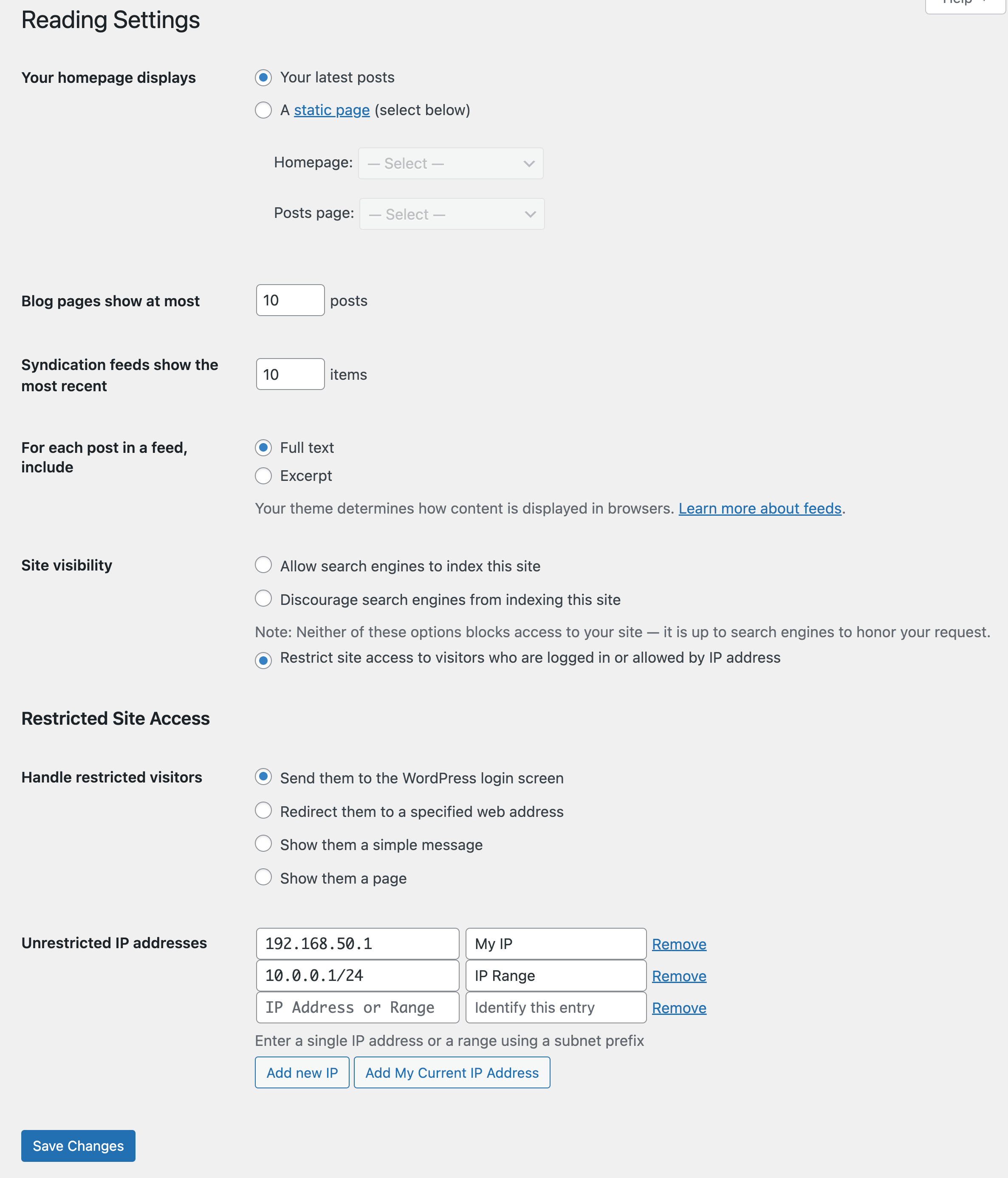
Adds a number of new configuration options to the Reading settings panel as well as the Network Settings panel in multisite. From these panels you can:
- Enable or disable site restriction
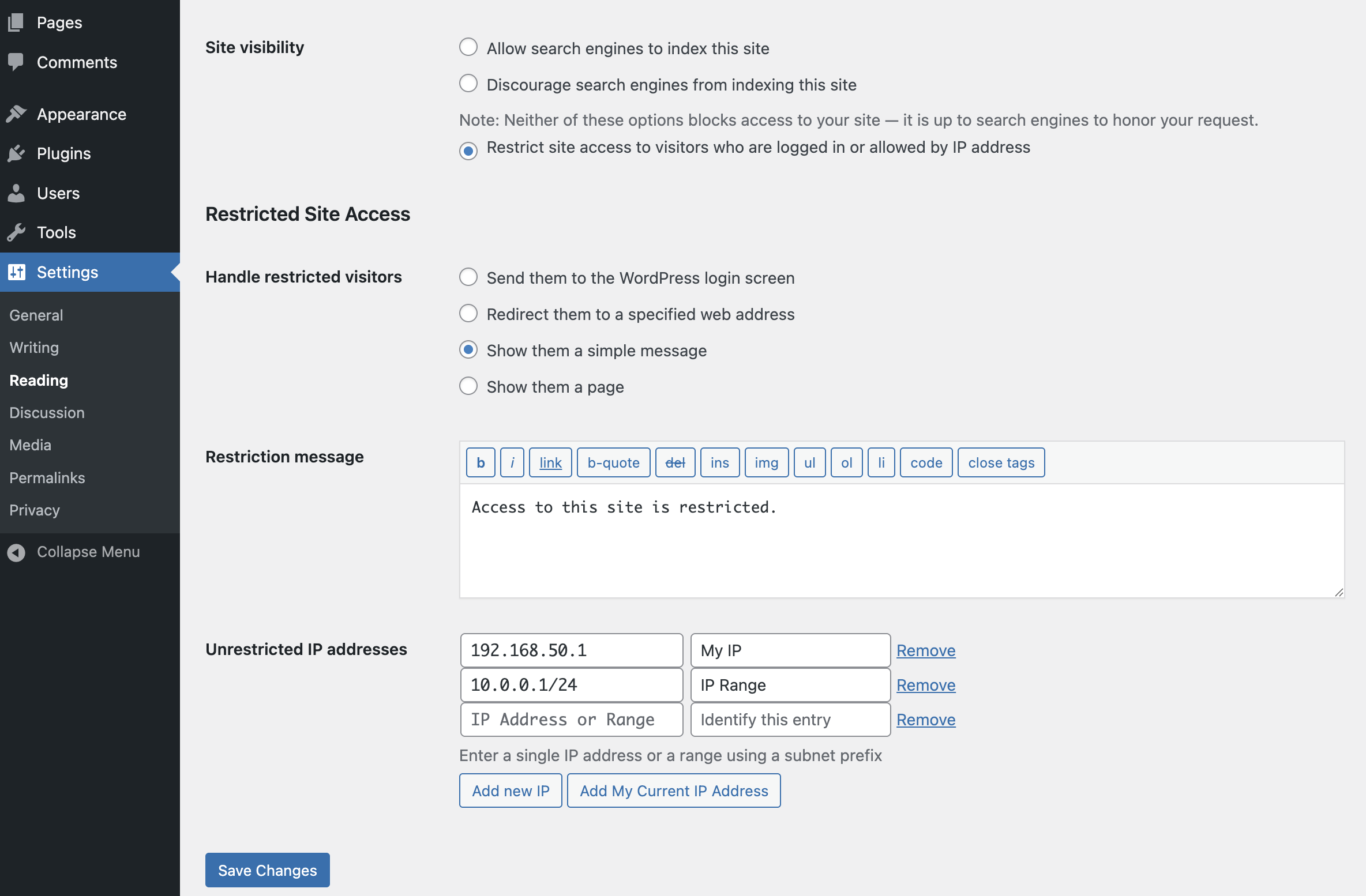
- Change the restriction behavior: send to login, redirect, display a message, display a page
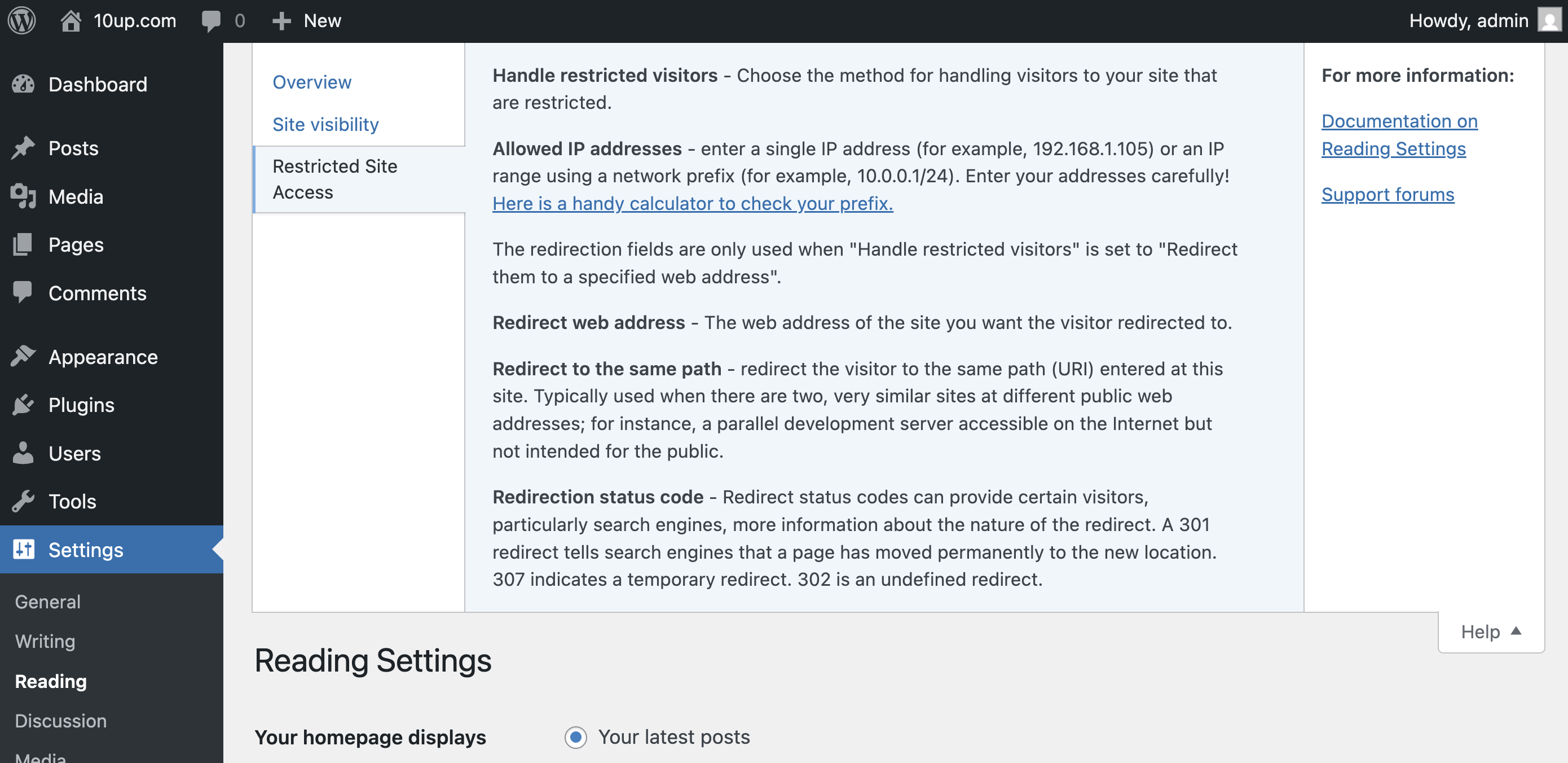
- Add IP addresses to an unrestricted list, including ranges
- Quickly add your current IP to the unrestricted list
- Customize the redirect location, including an option to send them to the same requested path and set the HTTP status code for SEO friendliness
- Define a simple message to show restricted visitors, or select a page to show them – great for “coming soon” teasers!
- Rating

- Requires 6.6+
- Downloads 1,138,489
- Updated 2026-01-04
Hello, we are working on a WordPress project through our host WPEngine, using the restricted-site-access.7.2.0 plugin and have found that the plugin does not work as expected for the Legacy Staging WPEngine.com websites; but does work for the separate WPEngine.com “Staging / Development” sites. When we say, “doesn’t work”, this means that for the Legacy Staging sites the plugin doesn’t save the user settings in the Settings Reading panel, making it unusable.
We have reached out to WPEngine.com support for this issue and they have suggested we contact the plugin author. We have tried disabling plugins one-by-one and also changing the theme, but no luck so far. The project goal is to use restricted-site-access.7.2.0 plugin for both Legacy Staging sites and “Staging / Development” sites. Is there a way we can make this work?
Best regards, Tami Lucas
Consultant, Software Development
GCM Grosvenor
900 North Michigan Avenue, Suite 1100
Chicago, IL 60611
T +1-312-550-3346
[email protected]
Tami – I’m not immediately familiar what’s unique about “Legacy Staging WPEngine.com websites”, can you share environmental details there (especially as compared to a similarly functioning WP Engine environment)? Also getting that info into a GitHub issue will help ensure the rest of the engineering team sees the issue and can help troubleshoot for you.
Hello, is there a way to integrate this page with the WPML plugin so that the content on the restricted page is translated? Specifically I have a contact form on this page that should be translated.
Thank you
Chad – I haven’t worked with WPML in a while, but if I recall correctly that plugin creates a multisite with each language being a different subdirectory site. In that case it sounds like you would want to have Restricted Site Access installed on each multisite instance and redirect restricted visitors for each subdirectory site to the respectively translated page.
If I have misunderstood your question or how WPML works, then please clarify and I’ll do my best to help… thanks!
Jeff.
Does this plugin support Ipv6?
Shubhra – The plugin allows IPv6 entries, but does not yet fully and properly validate them. You can subscribe to updates on this GitHub issue to see when this is fully supported within the plugin… thanks!
Jeff.
Does this plug-in enable Application password to be used ?
We have a multi site install and we use the 10up Syndication plug-in between sites external sites. With the restricted site access enabled the syndication can no longer authenticate on our primary site to initiate the connection
Tamas – Restricted Site Access does not yet allow for Application Password access through to protected sites (e.g., ones you’re trying to connect using Distributor), but we’ve opened GitHub issues for both Restricted Site Access and Distributor so we can research a proper handling for this scenario. I’d recommend subscribing to those two issues to get the most relevant updates to when this is fully supported for your needs… thanks!
Jeff.
This plugin needs to have the basics right, after installing the following also get restricted so it kills the purpose:
1. reset password
2. password reset activation
3. register
4. forgot password
5. any other plugin login page like members only etc.
Can you please help!
Sheraz – Our team just tested version 7.3.5 (the current version) while logged out and new user registration, login through WP Admin, forgot password, and password reset all worked as expected. If you’re still having problems, please open a support case via https://wordpress.org/support/plugin/restricted-site-access/.
Thanks!
Jeff.
none of these work now. When i try to click anything it just reloads the login page. Please fix as nobody can register or reset password now on the site they can only login.
Ashely – note that I’ve opened https://github.com/10up/restricted-site-access/issues/375 to add more specific handling for this within Restricted Site Access. Subscribe to that issue to get updates as it comes available in the plugin.
Testing ARS logged out but still have access to site. I have registered my ip address as allow is this why I don’t receive the login screen.
Dean – When you add an IP address or range to the Unrestricted IP addresses list, then anyone trying to access from those addresses will be unrestricted when viewing your site. If you have additional questions, then please open a support case via https://wordpress.org/support/plugin/restricted-site-access/.
Thanks!
Jeff.
Hi, I’m pretty sure this plugin was working well previously, but now my WordPress settings keep reverting back to ‘Discourage search engines from indexing this site’. My IP restrictions etc are still there when I click on ‘Restrict site access’, but when I save it goes back to ‘discourage search engines’. Any ideas why this is happening? Thank you
Maxine – that sounds like there may be another plugin conflicting with Restricted Site Access, perhaps even something your host may be enforcing. I’d recommend generating a Site Health Export and then opening a support request either on WordPress.org or GitHub for our engineering team to further triage.
Thanks!
Jeff.
Hi, does the plugin offer WPML support/compatibility?
I have a multilingual site (Italian and English) in which I installed the plugin and set the “Show them a page” mode with the “my account” page set for Italian and “my account” for English: the site Italian works, the English one instead generates a series of redirects.
Have you encountered similar problems?
Hi Paola, can you help us with some more details:
1. Is your website single or multi-site?
2. Just to confirm, you are trying to redirect a user on the (EN) site to the (EN) version of the “My Account” page, and a user on the (IT) site to the (IT) version of the “My Account” page. Did I understand correctly?
Restricted site access. I am having issues added new IP address that can have access. When I add the IP the save button greys out, unable to save.
Jairo – If you can provide a screenshot/screencast of your issue and an export from your Site Health report and share that either via a WordPress.org Support request or a GitHub issue, then our team can work to help triage with you there… thanks!
hello im trying to figure out how to allow users to register when this is active. They can login but when they click to register, it just reloads the login page. It wont allow anyone to register. How do i fix this?
Ashley,
This prior comment seems to have a fix for the register page: https://10up.com/plugins/restricted-site-access-wordpress/#comment-825610. However, here’s an updated code snippet with a few changes that may also work for you:
add_filter(

	'restricted_site_access_is_restricted',

	function ( $is_restricted, $wp ) {

		if ( ! empty( $wp->request ) && 'wp-signup.php' === $wp->request ) {

			$is_restricted = false;

		}

		return $is_restricted;

	},

	10,

	2

);
Jeff.
Hi Jake! Congratulations for this great plugin. It’s a must have for intranets development.
I have a site where I use the option “Show them a page” for restricted visitors. In that page, I have a WP login form and a Contactform 7 form for people with no credentials to claim one. But the Contactform 7 form doesn’t work if Restricted Site Access plugin is activated. It must be blocking something CF7 uses. How can I override this?
Note that we don’t use the WP native registration form because the users log connecting to an external Active Directory through LDAPs. Enabling the WP native registration form is not a solution.
Kind regards!
Esteban – you’ll need to identify with the Contact Form 7 folks how their forms are output, but once you get that info you can hopefully make use of the hook we’ve noted here https://github.com/10up/restricted-site-access#how-do-i-allow-access-to-specific-pages-or-parts-of-my-site.